In 2019, during a high-profile criminal proceeding in United States federal court, defense attorneys submitted a 10-page sentencing memorandum intended to redact sensitive communications involving senior political figures. To shield the names and dates, the legal team drew solid black rectangles directly over the confidential paragraphs inside their desktop PDF editor before saving and transmitting the file.
Within five minutes of the public electronic court docket update, journalists opened the PDF, pressed Ctrl+A to select all text, copied the clipboard contents into a plain text editor, and published the unredacted classified names to international headlines.
The lawyers had committed one of the most widespread—and catastrophic—mistakes in digital document management: confusing visual concealment with cryptographic data sanitization.
In this technical masterclass, we break down the internal graphics architecture of the Adobe PDF specification (ISO 32000-1), demonstrate exactly why drawing black shapes fails to remove underlying character data from content streams, examine forensic text-extraction techniques, and present the definitive workflow for executing true, permanent binary redaction.
The Vector Overlay Illusion: How PDF Layers Actually Work
To understand why "blacking out" text fails, one must inspect how PDF viewports render vector commands and typographic glyphs.
A standard office document format (such as Microsoft Word .docx or HTML) operates with a fluid, contextual layout model. When you delete a word in a word processor, the word is eradicated from the XML payload, and adjacent words shift to fill the void.
The Portable Document Format operates under a completely different paradigm: an absolute Cartesian coordinate system with independent, stacked rendering operations.
+-------------------------------------------------------------+
| RENDER LAYER 2: Vector Shape Overlay (Visual Black Box)     |
| Operator: 0 0 0 rg 120 450 280 24 re f                      |
+-------------------------------------------------------------+
                              |
                              v  (Drawn on top of)
+-------------------------------------------------------------+
| RENDER LAYER 1: Text Content Stream (Original Sensitive Data)|
| Operator: BT /F1 12 Tf 125 456 Td (CONFIDENTIAL ACCOUNT:    |
| 4892-0192-3819) Tj ET                                       |
+-------------------------------------------------------------+
When an untrained user "redacts" a PDF using basic annotation tools, pen markers, or black rectangle shapes in standard office software:
- The software appends a new vector drawing operator to the page's
/Contentsstream:0 0 0 rg 120 450 280 24 re f(Set fill color to black, define rectangle atx=120, y=450with width280and height24, and fill it). - The original text operator is never modified, shifted, or erased:
BT /F1 12 Tf 125 456 Td (CONFIDENTIAL ACCOUNT: 4892-0192-3819) Tj ETremains fully intact in the binary stream immediately beneath the rectangle. - When rendered on screen or printed to physical paper, the black rectangle covers the visual rendering of the characters.
- However, the document parser, search engine indexer, accessibility screen reader, and operating system clipboard read the underlying content stream sequentially.
To the PDF rendering engine, the text is 100% alive, indexed, and selectable.
3 Fatal Flaws of Amateur Redaction
Because text operators remain in the stream, pressing Ctrl+A and Ctrl+C copies all underlying characters instantly. Automated scrapers like pdftotext or Python's pypdf ignore visual coordinates completely.
Drawing a black box over a PDF form input only masks the display view. The underlying /V (Value) dictionary key retains the raw string in unencrypted plaintext inside the form metadata.
If a scanned contract was processed with OCR, blacking out the bitmap image leaves the invisible vector search layer untouched. The text continues to match keywords and highlight in viewer search dialogs.
Forensic Inspection: Peeking Beneath the Black Box
Let us demonstrate how trivial it is for an adversary, auditor, or journalist to retrieve data from an improperly masked PDF.
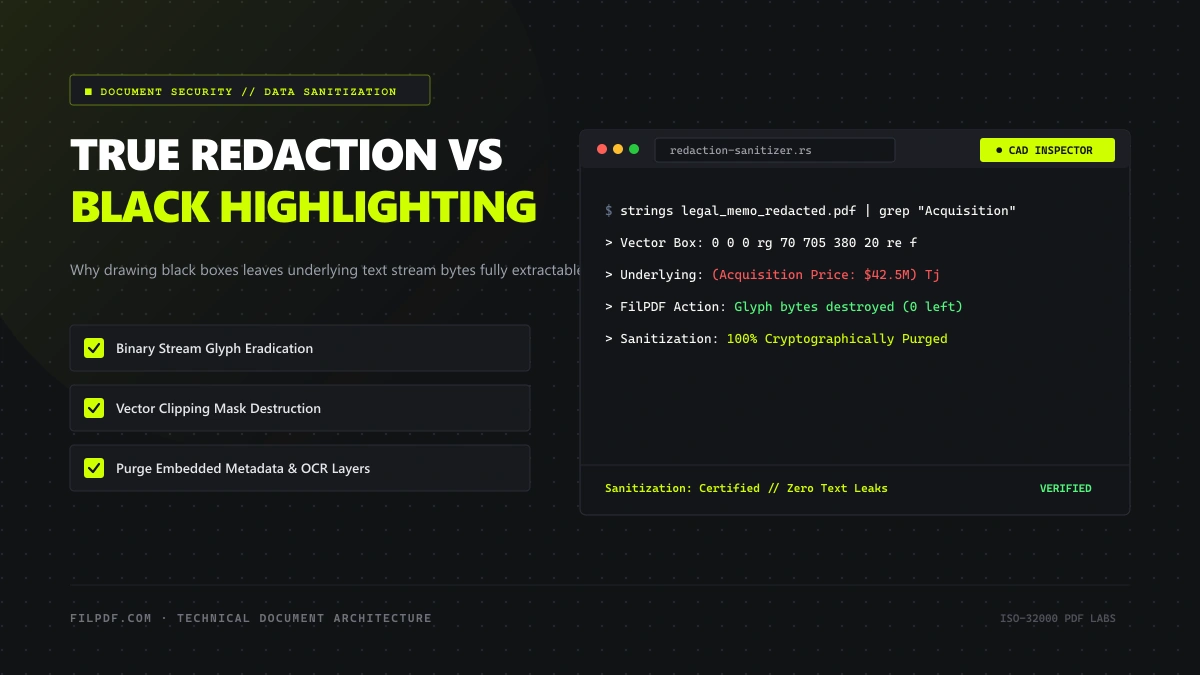
Consider a confidential nondisclosure agreement where the acquisition price has been "covered" with a black rectangle in a consumer PDF viewer. If we open the file in a Unix terminal and run a raw stream extractor:
# Extract raw ASCII and UTF-8 strings from the PDF binary
$ strings non_disclosure_agreement_redacted.pdf | grep -i "acquisition"
The terminal output reveals the truth immediately:
/Title (Confidential Acquisition Memorandum)
/Author (Jane Doe, Corporate Counsel)
BT
/F2 14 Tf
72 710 Td
(The final agreed acquisition price for Target Corp is $42,500,000 USD.) Tj
ET
0 0 0 rg
70 705 380 20 re f
Notice the sequence of operators:
- The text string
(The final agreed acquisition price for Target Corp is $42,500,000 USD.)is drawn via theTjoperator. - Immediately afterward,
0 0 0 rgswitches the fill color to black, andre fdraws a filled rectangle directly over the coordinate bounds[70, 705, 380, 20].
No cryptographic decryption, forensic recovery software, or advanced computer science is required. Anyone with a web browser or a command prompt can extract the sensitive data in a fraction of a second.
Furthermore, if the file is shared as an editable vector asset, a recipient can simply open the PDF in Adobe Illustrator, Inkscape, or Apple Preview, click on the black rectangle object, and hit Delete. The black box disappears, exposing the underlying text in pristine typographic clarity.
What Does "True Redaction" Actually Mean?
True redaction is an irreversible cryptographic and structural transformation. Under ISO 32000 specifications and National Security Agency (NSA) document sanitization guidelines, true redaction mandates a four-phase purge:
[Phase 1: Coordinate Identification]
         │
         ▼
[Phase 2: Glyph Splitting & Stream Sanitization]
         │ ──> Physically delete character codes from /Contents
         ▼
[Phase 3: Visual Mask Baking]
         │ ──> Burn opaque visual redaction block into geometry
         ▼
[Phase 4: Metadata & Orphaned Object Cleansing]
         │ ──> Strip /XMP, /Info, and purge unreferenced XObjects
         ▼
[Result: Forensically Sanitized Document]
1. Byte-Level Character Destruction
The redaction engine calculates the exact geometric bounding box of the sensitive content in user space units. Any glyph, character operator (`Tj`, `TJ`, `'`, `"`), or inline image segment whose bounding box intersects the redaction rectangle must be **physically excised from the content stream**.If the sentence reads:
"The patient John Doe was diagnosed with hypertension."
And the name "John Doe" is redacted, the modified stream must literally rewrite the string operator to:
"The patient " followed by a coordinate displacement jump (Td), followed by " was diagnosed with hypertension."
The bytes representing J-o-h-n- -D-o-e cease to exist within the physical file.
2. Raster Pixel Destruction (For Scanned Bitmaps)
When redacting scanned documents or photographic records, the redaction engine cannot merely overlay black pixels. It must overwrite the raw byte values of the underlying bitmap image (`/Filter /DCTDecode` or `/FlateDecode`). In an uncompressed 24-bit RGB bitmap, every pixel inside the redaction coordinate envelope is permanently rewritten to `0x00, 0x00, 0x00` (pure black) or `0xFF, 0xFF, 0xFF` (pure white). The original pixel data is destroyed in memory before the stream is re-encoded.3. Destruction of Associated OCR Text Layers
In a searchable scanned PDF (often called a "Sandwich PDF"), there are two distinct layers: 1. The visible high-resolution scanned raster image. 2. An invisible, transparent text layer rendered directly over the scan with rendering mode `3 Tr` (invisible text) to enable selection and search.True redaction simultaneously burns black pixels into the visible image and excises the corresponding invisible OCR bounding boxes from the text layer.
4. Metadata and Revision History Purge
As explored in our technical breakdown of [why PDFs bloat and retain hidden objects](/blog/why-is-my-pdf-so-large), PDF editing applications frequently utilize *incremental saving*. When you hit "Save", the application appends new data to the end of the file without altering earlier bytes.If you use an inferior tool to "delete" text, the old text may remain permanently embedded in an earlier, unreferenced byte block inside the file's historical revisions! True redaction requires rebuilding the Cross-Reference Table (XREF) from scratch, purging orphaned objects, and wiping both the /Info dictionary and the Adobe XMP metadata packet.
Comparison: True Redaction vs. Superficial Masking
| Security Parameter | Black Highlighter / Shape Overlay | Print to Virtual PDF Driver | FilPDF Native True Redaction |
|---|---|---|---|
| Visual Appearance | Opaque black box | Opaque black box | Crisp CAD black or colored mask |
| Selectable Text Stream | ❌ Active & Extractable (Ctrl+C) |
⚠️ Variable (often retains text) | ✅ 100% Destroyed & Erased |
| Searchability via Script | ❌ Visible to grep & pdftotext |
⚠️ May be captured by OCR | ✅ Zero matching character bytes |
| Underlying Image Pixels | ❌ Unaltered beneath box | ❌ Re-compressed, not purged | ✅ Byte-level pixel overwriting |
| Vector Object Deletion | ❌ Box can be selected & deleted | ⚠️ Flattened, but inspectable | ✅ Irreversible binary burn |
| Document Metadata Sanitize | ❌ Retains author, dates, GPS | ❌ Often injects printer metadata | ✅ Cleansed & sanitized |
| Processing Security | ❌ Dependent on client app | ⚠️ Sends data to print spooler | ✅ 100% In-Browser RAM Sandbox |
Step-by-Step: How to Execute True Redaction on FilPDF
To permanently sanitize confidential records, tax forms, or legal discovery batches without leaking byte streams, follow this verified engineering workflow:
Load Document into In-Browser Sandbox
Navigate to the FilPDF Redact PDF tool. Drag and drop your confidential file into the workspace.
Unlike traditional cloud-based PDF conversion portals that transmit your sensitive files to third-party offshore servers—introducing severe compliance violations under GDPR, HIPAA, and SOC2—FilPDF processes your document entirely inside your local browser memory using high-performance WebAssembly. Your unredacted secrets never leave your device.
Permanently excise character glyphs, unreferenced XObjects, and bitmap pixels directly within your local browser RAM.
Select Text Segments or Coordinate Envelopes
Use the precision CAD cursor to highlight the exact text strings, social security numbers, bank routing codes, or photograph regions requiring redaction.
The FilPDF engine maps the screen coordinates back to the underlying PDF user-unit space (1/72 inch per unit) and identifies both the visual boundary and the underlying /Contents stream byte pointers.
Apply Cryptographic Binary Burn
Click Apply Redactions. The client-side engine executes a multi-point destruction routine:
- It splits overlapping text operators, eradicating the selected character codes.
- For embedded raster images, it repaints the bounding box pixels with opaque black values.
- It strips orphaned annotation dictionaries (
/Annots) and dynamic form fields (/AcroForm). - It compiles a completely new cross-reference index (
xref), discarding all previous revision histories.
Optional: Flatten and Lock Dynamic Layers
If your document contains complex multi-layered annotations, interactive form widgets, or electronic signatures, pair your redaction with our PDF Flatten tool.
Flattening merges all visual elements into a single static render stream, preventing any subsequent recipient from re-activating disabled form fields or manipulating vector stacking orders. Read our detailed architectural guide on how to flatten PDF form layers for archiving to understand why this step is critical for legal filings.
Before transmitting any redacted document to opposing counsel, regulatory agencies, or the press, always perform the "Triple-Zero Verification":
1. The Clipboard Test: Open the exported file in Google Chrome or Adobe Acrobat. Press Ctrl+A, copy to clipboard, and paste into a blank Notepad window. Verify that no hidden characters appear.
2. The String Audit: Run pdftotext output.pdf - | grep -i [sensitive_word] to verify that command-line scrapers cannot locate the keyword.
3. The Metadata Inspection: Check document properties to ensure author names, internal company server paths, and modification dates have been wiped clean.
The Threat of Hidden Metadata Leaks
Even when the visible text stream has been successfully redacted, documents frequently leak classified details through unstripped metadata.
Every modern desktop application leaves digital fingerprints in two places:
- The Document Information Dictionary (
/Info): Contains static keys including/Author,/Creator(e.g.,Microsoft Word for Mac 16.78),/Producer(e.g.,macOS Version 14.2 Quartz PDFContext), and/CreationDate. - The Extensible Metadata Platform (
/Metadata): An embedded XML stream standardized by Adobe containing historical revision tracks, printer color calibrations, and even original document titles drafted prior to settlement negotiations.
For example, in 2005, the United States military released an official report on an incident at a Baghdad checkpoint. While sensitive names were blacked out on the pages, the author neglected to clear the metadata and outline bookmarks—allowing researchers to reveal the censored military personnel names within minutes.
To eliminate this attack vector entirely, review our technical walkthrough on how to strip hidden metadata and revision histories from PDF files.
Real-World Legal & Enterprise Implications
Improper redaction is not merely a theoretical technical flaw; it carries severe real-world liability under modern data protection regimes:
1. GDPR & Data Privacy Penalties (EU/UK)
Under Article 32 of the General Data Protection Regulation (GDPR), organizations must implement appropriate technical and organizational measures to ensure security. Transmitting customer Personally Identifiable Information (PII) masked only with visual black boxes constitutes an active data breach, exposing organizations to fines up to €20 million or 4% of annual global turnover.2. HIPAA Compliance in Healthcare (United States)
The Health Insurance Portability and Accountability Act mandates the complete de-identification of protected health information (PHI) across 18 distinct identifiers (names, geographic subdivisions, dates, medical record numbers). Medical records shared in court or medical research with superficial black highlights violate federal law and trigger mandatory breach notification protocols.3. Court Sanctions & Malpractice
Judicial courts across North America and Europe routinely sanction law firms that file improperly redacted exhibits. In several landmark commercial litigation disputes, judges ruled that releasing a document with extractable text under visual black boxes **constitutes a permanent waiver of attorney-client privilege**, compelling the firm to turn over the unredacted documents to opposing counsel!Summary: Redact with Absolute Mathematical Certainty
The human eye and the digital PDF parser perceive documents through completely different lenses. What appears opaque, solid, and redacted on your screen is often completely exposed in the underlying binary stream.
Remember these immutable document security rules:
- Never use highlighter pens, drawing tools, or rectangle shapes in basic viewers to conceal secrets.
- Never assume that "printing to PDF" strips underlying text; modern virtual print drivers frequently pass vector text commands directly through to the new file.
- Always utilize a dedicated client-side redaction utility like FilPDF Redact PDF that executes physical character code destruction and stream sanitization.
- Always combine redaction with PDF metadata stripping and layer flattening.
Protect your client data, prevent regulatory fines, and safeguard your organization's reputation by making true binary redaction a non-negotiable standard in your document workflow.